Installing LEDE on Linksys EA3500
Note: While this has worked for me on a few units it’s also resulted in a few units becoming unusable. Other people have reported similar issues.
This is my experience installing LEDE firmware on a Linksys EA3500. This is a sub $30 router available for sale on Amazon that supports 2.4Ghz and 5Ghz with enough memory for decent projects.
Upgrading the router from the stock router firmware to LEDE required an intermediate step of first upgrading to OpenWRT.
- Install openwrt-kirkwood-linksys-audi-squashfs-factory.bin on the factory firmware.
Tip: If the router stops responding after 5 minutes and the power light is rapidly blinking try power-cycling it. If that does not work and the power light is still rapidly blinking then unplug the router, and while holding the reset button in plug the router in. Keep the reset button pressed for 15 seconds and release. The router might reboot into a usable state. - SSH into the router
- Exec
opkg update - Exec
opkg install luci - Open the router admin page and install the LEDE sysupgrade firmware lede-17.01.4-kirkwood-linksys-audi-squashfs-sysupgrade.tar
Google ‘Now’ Can’t Make a Decent List
Slowly I started to use the Google Now Assistant to add items to a Google Keep list of items that I could make simply by saying ‘Ok Google, add widget to list parts’ and it would add a line in the list named ‘Parts’ where I could view, organize, and share it in Google Keep. To my surprise items sent to a list now appear in the Google Shopping list app… I mean site which is related to something called Google Express which I’ve also never heard of. I echo the sentiments of Ron Amadeo in his ARS Technica write-up about the situation.
I’ll be searching for an alternative solution but it appears Google Assistant is a closed solution. Maybe Cortana + Wunderlist is a viable solution.
Installing Sealion on Centos 5 – Python Dependency
Overview
This is a short guide containing the steps I took to install Sealion on an older Centos 5 server. Sealion is a activity monitoring service website that reports the status of your linux every 5 minutes. An agent running on your server runs a set of common commands (i.e. ps, top, vmstat, …) and reports the results back to the sealion.com site web console where you can view the results. The Sealion introduction video says it all.
Installation Problems
The normal agent installation is usually a one line command but it failed on my server with this python dependency error:
Performing dependency check…
Error: Python dependency check failed
File “../bin/check_dependency.py”, line 19
except Exception as e:
^
SyntaxError: invalid syntax
The Sealion site didn’t list the dependencies and there weren’t any support documents that I could find. I emailed Sealion and they replied with a link to this article for installing Python 2.7 on RedHat or SUSE.
Installing Python 2.7 got me one step closer but failed during the make process for the sqlite module with the following error:
In function ‘_pysqlite_set_result’:
error: ‘sqlite3_int64’ undeclared
After some searching this article came up listing the error as a known bug in Python 2.7.3. I repeated the Python installation with 2.7.8 and substituted the correct Pthyon version into the agent installation curl command and all worked.
Complete Procedure
- wget https://www.python.org/ftp/python/2.7.8/Python-2.7.8.tgz
- tar -xvf Python-2.7.8.tgz
- cd Python-2.7.8
- ./configure
- make
- make install
- curl -s https://agent.sealion.com | sudo bash /dev/stdin -o YOURSEALIONKEY -p /usr/local/bin/python2 Tip: The -p parameter specifies which version of python to use. Substitute /usr/local/bin/python2 with the location your make install command placed Python and YOURSEALIONKEY with the user key obtained from the Sealion add server screen.
Note: As part of the troubleshooting process I updated sqlite but I’m not certain this was required. If you have problems try:
yum install sqlite.i386 sqlite-devel.i386
This installed and started the Sealion agent and after a few minutes server and server data appeared in my Sealion.com console.
Thoughts About Sealion
This is my first attempt at evaluating the Sealion linux server monitoring service. Other servers more up-to-date distributes installed the agent without issue.
The Sealion site is beautiful, functional, but a little sparse on content. There are only sporadic references to it across the internet (as of the time of writing) when I went searching for installation assistance. The lack of community activity leaves me a little worried about the reputation of Sealion but I can’t deny that the service is useful and easy to use. Their support email address responded quickly when I finally submitted my issue.
The service meets a need and has value to me. I hope to see it’s reputation increases and turn into a reasonably priced service.
Revision: 2014-07-04 Minor correction thanks to feedback from Team Sealion.
NetBeans 8 Navigator Empty or Blank When viewing Drupal PHP Files
It was exciting to see NetBeans 8 released as I use it as my primary editor for PHP projects (along with Xdebug of course) but the excitement was short lived when the navigator window frame was empty for all of my Drupal project files. After a bit of googling and checking the NetBeans bug tracker I wasn’t getting anywhere until I tried one last ditch generic search on Google which held the answer.
According to this blog posting it was discovered that the .install and .module files lose their content type and aren’t parsed as PHP files. A simple configuration change to set the correct content type fixes the issue. Wonderful!
Create a Bookmark that Always Points to Today’s Freshbooks Timesheet
Do you want to access your freshbooks timesheet with as few clicks as possible? The directions below walk you through creating a dynamic JavaScript based bookmark that will always point to todays Freshbooks timesheet by calculating the correct URL to go to.
Creating such a link on your browser’s bookmark bar or favorites list can be a time saving step for quickly logging in and recording your time. To create the link follow these steps:
- Locate your Freshbooks domain by logging into Freshbooks account and looking at the address bar. The highlighted text in the image below indicates where your freshbooks domain is located in the URL.

- Copy the text below. This is the dynamic JavaScript URL which will always point to your Freshbooks timesheet:
javascript: var dt = new Date();var d=dt.getDate();var m=dt.getMonth()+1;var y=dt.getFullYear();window.location='https://YOURFRESHBOOKSDOMAIN.freshbooks.com/timesheet#date/'+y+ "-" + (m<=9 ? '0' + m : m) + "-" + (d <= 9 ? '0' + d : d);
- Right click on the bookmark bar and create a new bookmark.
- Paste the text into the bookmark URL field:
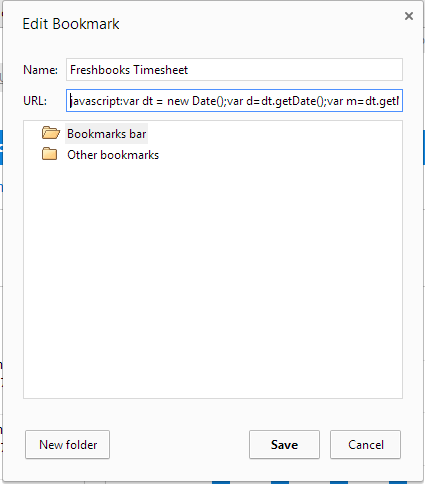
- Before saving the bookmark you must change the URL text “YOURFRESHBOOKSDOMAIN” with the Freshbooks domain found in step one. For example, if your domain was “mycoolcorpinc” the URL should read:
javascript: var dt = new Date();var d=dt.getDate();var m=dt.getMonth()+1;var y=dt.getFullYear();window.location='https://mycoolcorpinc.freshbooks.com/timesheet#date/'+y+ "-" + (m<=9 ? '0' + m : m) + "-" + (d <= 9 ? '0' + d : d); - Save the bookmark. You should now have a bookmark link or favorite that points you to the current day timesheet.
Click on the new bookmark and the browser will direct you to your freshbooks account and compute the current date of the timesheet to display. Your address should resemble the image below except ‘yourfreshbooksdomain’ will be replaced with your domain i.e. mycoolcorpinc and the date on the end of the URL will be today’s date.
